LiveDelay · OBS plugin
LiveDelay - delay without reconnecting.
An OBS Studio plugin that sits between you and the platform. Arm, Activate - viewers are N seconds behind. Cut - you are live again. The stream never drops.
What LiveDelay does
- Turn delay on and off mid-broadcast - no reconnect.
- Several platforms at once: Twitch, YouTube, Kick, Facebook or any RTMP/RTMPS server.
- Native Qt dock and hotkeys (Arm, Activate, Cut, Cut after it airs).
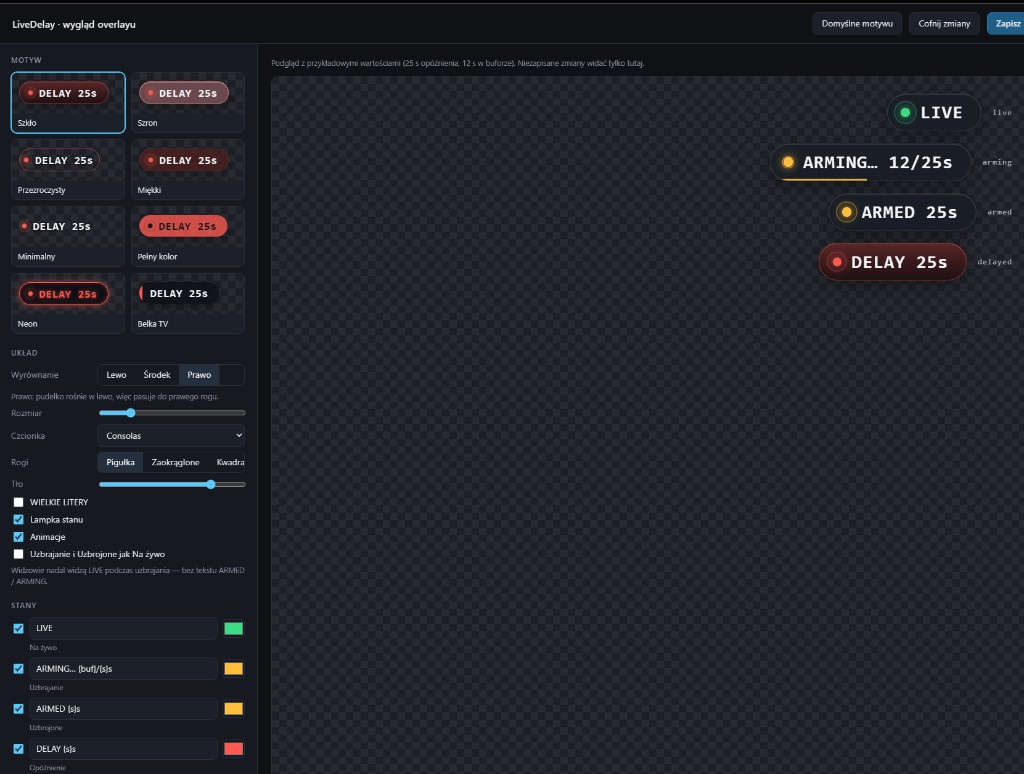
- Viewer overlay (LIVE / ARMING / ARMED / DELAY) with glass themes and optional Armed = Live.
- Local API for Stream Deck and scripts (127.0.0.1:7799).
How to start
- Open livedelay.vxh.pl and download the zip from GitHub.
- Close OBS, unzip into your OBS folder and confirm merging.
- Tools → LiveDelay → “Route OBS through LiveDelay”, then Docks → LiveDelay.
Official site and source
Full docs, dock demo and FAQ live at livedelay.vxh.pl. Source code (GPL-2.0-or-later): github.com/skullboypl/livedelay-obs.
Frequently asked questions
What is LiveDelay?
An OBS Studio plugin that lets you turn stream delay on and off during a broadcast without dropping the connection to the platform.
Is it a separate program?
No. The buffering proxy runs inside OBS as part of the plugin.
Where is the official site?
At https://livedelay.vxh.pl/en/ (Polish: https://livedelay.vxh.pl/).
How much does it cost?
Nothing. The code is open source under GPL-2.0-or-later.
See also